Set Up HitRecNotes in 5 Minutes
Get HitRecNotes up and running in about 5 minutes. Follow the guide below, or if you'd prefer a hand, book a free setup call and we'll do it together over screen share.
Book a free 10-minute setup call and we'll get you up and running together. No tech skills needed.
Overview
Hit Rec Notes uses OpenAI's Whisper API to convert your speech to text. This is the same technology that powers ChatGPT's voice features, and it's incredibly accurate.
We use a "Bring Your Own Key" (BYOK) model, which means:
- You pay OpenAI directly for the transcription (about $0.006 per minute)
- Your audio goes directly to OpenAI – we never see or store it
- No subscription fees – you only pay for what you use
This keeps Hit Rec Notes simple and affordable. You control your data and costs, and we don't need to run expensive servers.
Step 1: Get Your OpenAI API Key
Create an OpenAI account
Go to platform.openai.com/signup and create an account. If you already have a ChatGPT account, you can use the same login.
Navigate to API Keys
Once logged in, go to platform.openai.com/api-keys or click on your profile icon → "API keys" in the menu.
Create a new secret key
Click "Create new secret key". Give it a name like "Hit Rec Notes" so you remember what it's for.
Copy and save your key
Your key will look something like this:
sk-proj-abc123xyz789...Copy it immediately! OpenAI only shows the full key once. Store it somewhere safe.
Never share your API key publicly. Anyone with your key can use your OpenAI credits. Treat it like a password.
Step 2: Add Credits to Your Account
OpenAI requires prepaid credits for API usage. New accounts may have limited free credits, but you'll likely need to add funds.
Go to Billing
Navigate to platform.openai.com/account/billing
Add payment method & credits
Add a credit card and load some credits. $5-10 is plenty to start – this will give you roughly 800-1600 minutes of transcription.
In Settings → Limits, you can set a monthly spending cap. We recommend setting one for peace of mind.
Step 3: Install Hit Rec Notes
Download Hit Rec Notes from the home page.
- Download the
.exeinstaller - Run the installer and follow the prompts
- Hit Rec Notes will appear in your system tray (bottom-right corner, next to the clock)
Finding the System Tray
The system tray is the area with small icons at the bottom-right corner of your screen, next to the clock and date. Hit Rec Notes runs here quietly in the background.
Windows often hides new app icons. Click the small ^ arrow in your taskbar to reveal hidden icons. You'll find Hit Rec Notes there.
Keep the Icon Always Visible (Windows 10/11)
To pin Hit Rec Notes so it's always visible in your taskbar:
- Right-click on an empty area of your taskbar
- Select "Taskbar settings"
- Scroll down and click "Other system tray icons"
- Find "Hit Rec Notes" and toggle it ON
Alternatively: Settings → Personalization → Taskbar → Other system tray icons
Using the Tray Icon
- Right-click the icon → Opens a menu with Settings, About, and Quit options
- Closing the settings window just hides it — the app keeps running in the tray
- To fully quit: Right-click the tray icon → "Quit"
Step 4: Enter Your API Key
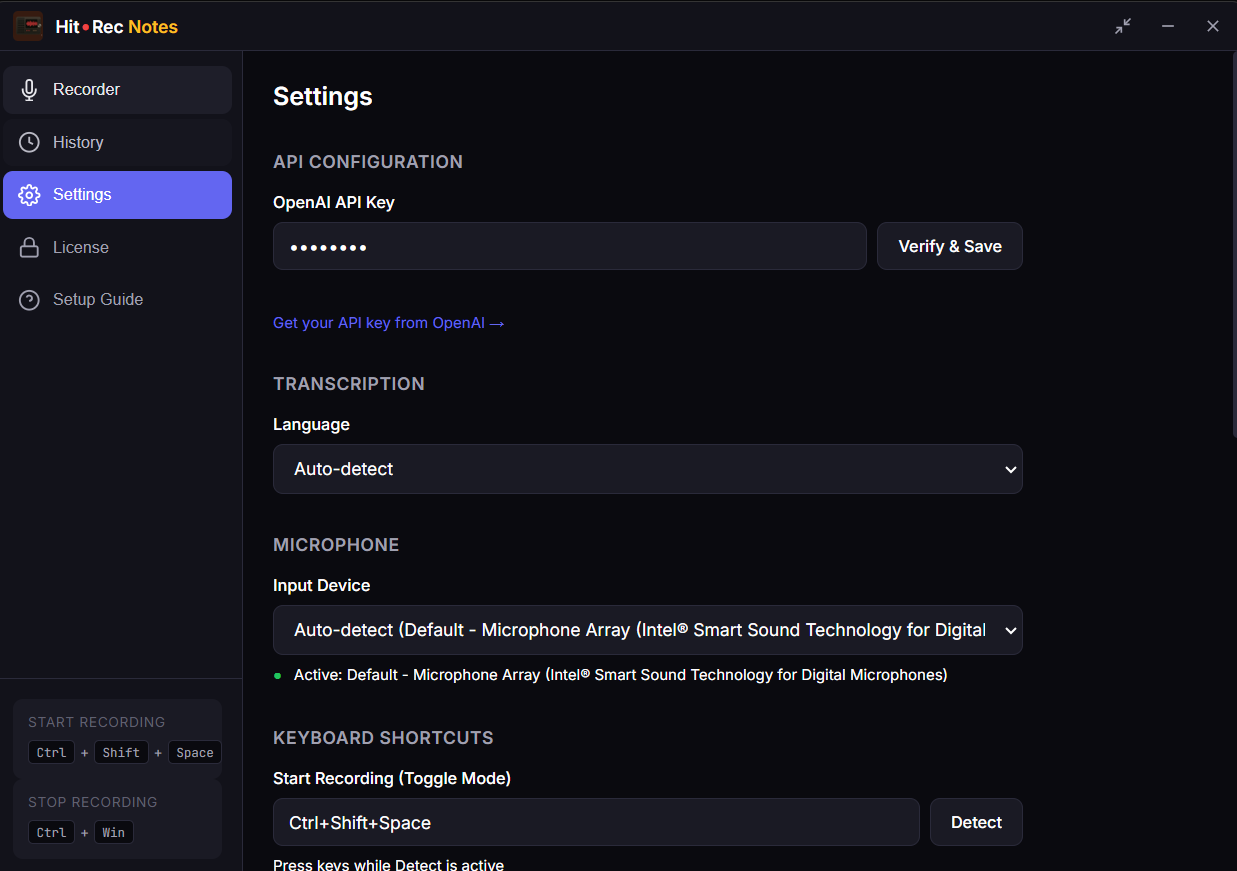
Open Hit Rec Notes settings
Click the Hit Rec Notes icon in your system tray and select "Settings".
Paste your API key
In the API Key field, paste the key you copied from OpenAI. Click "Validate" to confirm it works.
Save settings
Click "Save". You're ready to go!
Step 5: Test It Out
Let's make sure everything works:
- Open any text field (Notepad, your browser, a chat app)
- Position your cursor where you want text to appear
- Hold CtrlWin and speak
- Release the keys
- Your transcribed text should appear!
If you see your spoken words appear as text, you're all set. Welcome to Hit Rec Notes!
Hotkey Reference
Hit Rec Notes has two recording modes:
| Mode | Hotkey | How it works |
|---|---|---|
| Hold Mode | CtrlWin | Hold to record, release to transcribe. Best for quick notes. |
| Toggle Mode |
CtrlShift\ start CtrlWin stop |
Start and stop manually. Best for long dictation sessions. |
API Costs
OpenAI Whisper API pricing is simple:
| Usage | Cost |
|---|---|
| Per minute of audio | $0.006 |
| 1 hour of dictation | ~$0.36 |
| $5 credit | ~833 minutes (~14 hours) |
| $10 credit | ~1,666 minutes (~28 hours) |
Most users spend less than $1-2 per month on transcription. That's a fraction of subscription services.
Troubleshooting
"Invalid API key" error
- Make sure you copied the entire key (it starts with
sk-) - Check that there are no extra spaces before or after the key
- Verify the key hasn't been revoked in your OpenAI dashboard
"Insufficient quota" error
- Add credits to your OpenAI account at Billing settings
- New accounts may need to wait a few minutes after adding credits
No text appears after recording
- Ensure your microphone is working (test in another app)
- Check that Hit Rec Notes has microphone permissions
- Make sure your cursor is in a text field that accepts input
Hotkey doesn't work
- Check if another app is using the same hotkey
- Some apps run as administrator – Hit Rec Notes needs to match
- Try restarting Hit Rec Notes from the system tray
Email us at support@hitrecnotes.com or visit our support page.